
How Teachers Are Making the Most of Their PEER Physics eBooks
eBooks are one of our most popular offerings. That’s because PEER Physics’s eBooks go beyond the traditional online textbook. Each Student Guide and Teacher’s Guide comes with a set of built-in resources that help teachers plan and communicate with students more efficiently and improve student learning. We’ve spoken to PEER Physics teachers about the eBooks, and they shared more about their favorite eBook tools and what makes them so great.
Built-In Features Increase Accessibility
- Students and educators alike can use embedded tools like text-to-speech, variable fonts and font size, and changing color displays to ensure all learners have access to the content they need. All Student Guides are also available in Spanish through the eBook platform.
- PEER Physics eBooks are available on the VitalSource app, which is available offline on multiple devices, including laptops, desktops, tablets, and mobile devices. VitalSource automatically syncs any work done across these devices, allowing students and educators to access class resources from multiple settings.
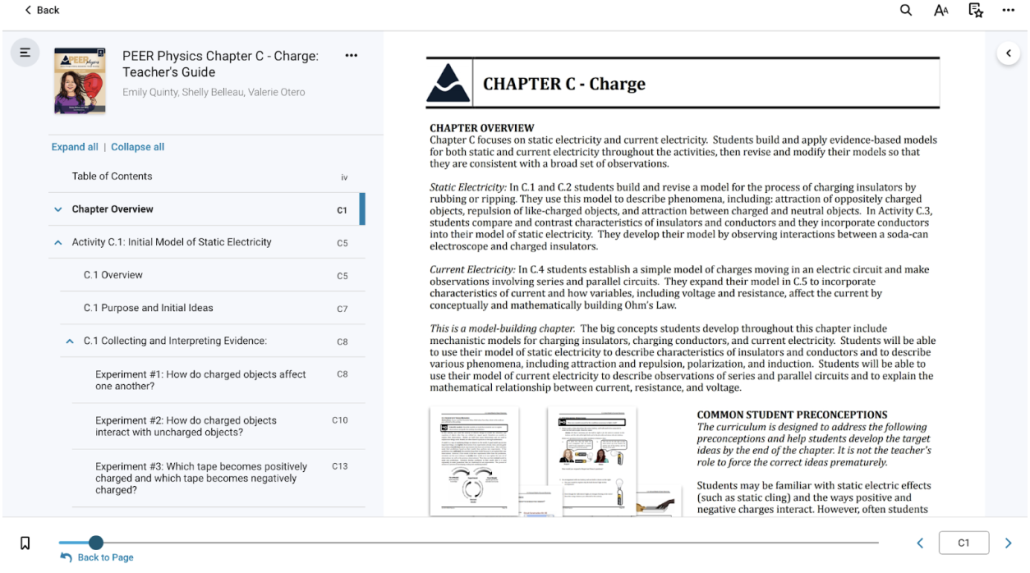
Figure 1: Chapter C: Charge Teacher’s Guide available on VitalSource.
Collaboration Tools Support Differentiation and Study Habits
- One of the most frequently used tools is the annotation suite. Students and teachers can highlight and annotate the text by adding notes or emoji reactions as they read and go through activities. There is also the option to create shared highlighters so that teachers can communicate additional instructions or reminders in real time. Many teachers use shared highlighters to support their full class as well as small groups. Some PEER Physics educators have a shared highlighter for each lab group, which allows them to keep track of each group’s progress through a chapter and provide feedback as needed. This is especially helpful to get students caught up after an absence!
- Another favorite tool is the flashcard creator. Students can create custom flashcard decks based on the text, allowing them to have quick access to key concepts, terms, and steps. Students can independently use “study mode” or the self-assessment feature to quiz themselves on key concepts and vocabulary as they prepare for assessments.
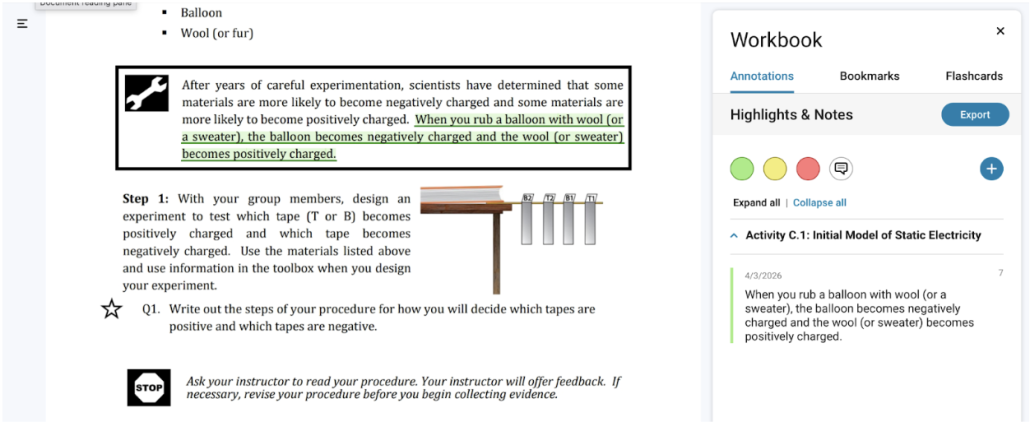
Figure 2: Shared highlighters in the Annotations feature of VitalSource allow student groups to track their collaborative progress PEER Physics chapters.
Navigation and Content Structure Make Planning Easier and More Efficient
- It’s easy to get pulled away from lesson planning, and it can be challenging to get back on track. But PEER Physics eBooks have quick navigation tools like a clickable table of contents, bookmarking, and an all-content-wide search function that help teachers pick up where they left off. The clickable table of contents is broken down by activity and experiment, making it even easier to jump in at the right spot.
- Teachers also love that they can easily manage and keep track of the pace at which students learn based on the content structure. Educators have full access to Student Guides and Teacher’s Guides for every chapter, while students can only access the Student Guides. But even though they can read ahead to future experiments, the Student Guides do not include Scientists’ Ideas Reading (the Teacher’s Guides do!), so students cannot skip too far ahead in the learning process.
To learn more about eBooks and other available resources, reach out to Emily. If you have a favorite tool, tip, or story from using your eBooks, we’d love to hear about it! Share your tips and tricks with Taylor.


Leave a Reply
Want to join the discussion?Feel free to contribute!